Wednesday, April 19, 2023

How to use Nearby Share On Windows & Android {Step-By-Step}

Nearby Share On Windows | Sharing files between Android and Windows is still a hassle. To transfer wirelessly, you'll need to rely on a data cable, use cloud storage, or use a third-party service. While Android and Windows both have Nearby Share, they had their own version that didn't work with each other until recently. Google released Near Share for Windows. Now you can seamlessly transfer files between Android and Windows using Google Near Share. In this article, we explain how to set up Near Share on Windows and use it to send and receive files from Android.

What’s Nearby Share

Nearby Share is an Android feature that uses Bluetooth, Wi-Fi, and Wi-Fi Direct to wirelessly share files between two Android devices. Since Nearby Share itself is now available as a standalone app on Windows, you can also take advantage of the ability to send and receive files between Android and Windows. But before that, you need to set up Near Share on Android and Windows.

How to Setup Nearby Share on Windows

  • Go to the Nearby Share download page from your Windows browser and click the Get Started button to download the application. As of this writing, the app is still in its beta phase.
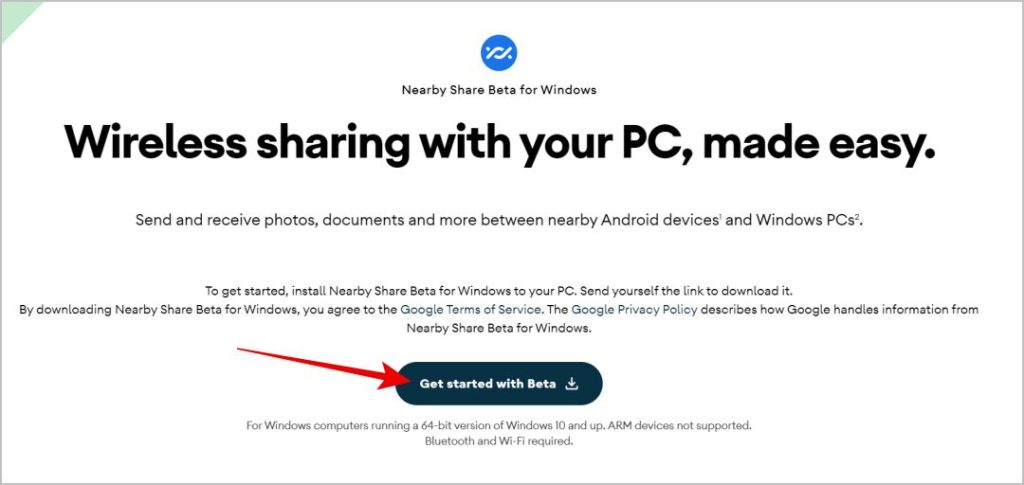
How to Setup Nearby Share on Windows
  • Once downloaded, open the downloaded file and click on the Yes option in the pop-up window. Nearby Share will begin to install on your device. After the installation is complete, click the Close button.
  • The Nearby Share app should start. If not, click on the Windows key and find the Near Share app and open it.
  • Here, click on the Sign In button to sign in to your Google account. You can continue without an account, but once you're signed in, you can transfer files between devices that are signed in to the same Google account without having to accept them from the other device. Also, your contacts can easily find you.
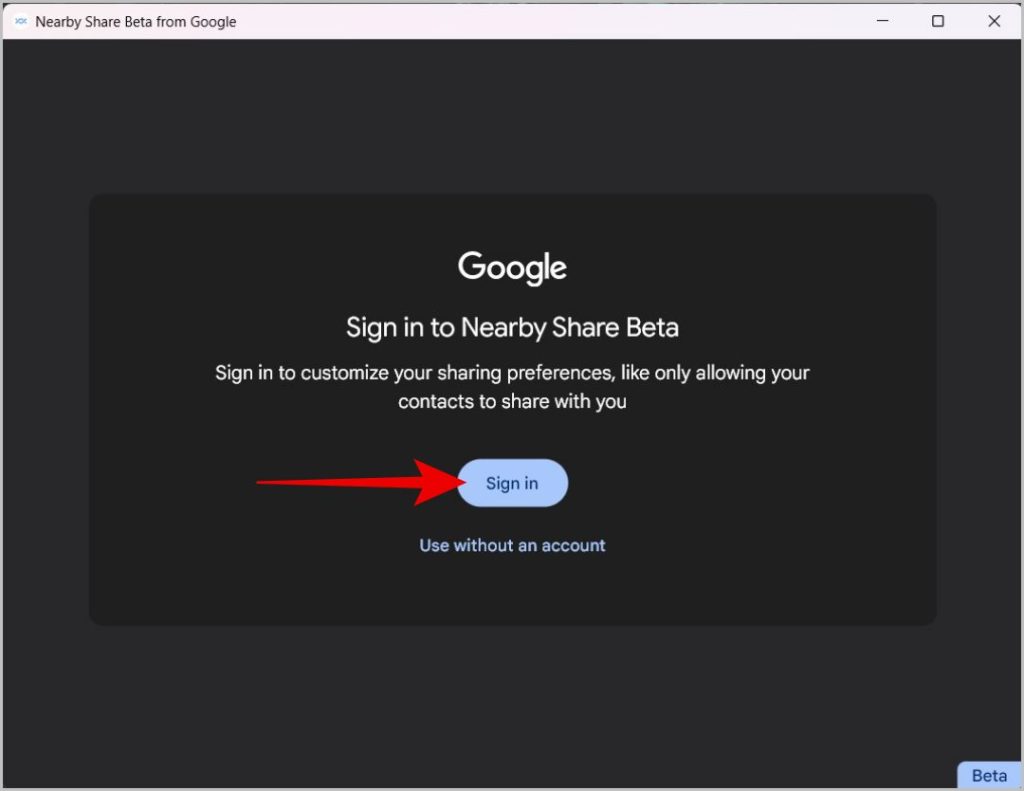
How to Setup Nearby Share on Windows
  • Open the Google login page in your default web browser, and sign in with your Google account.
  • After logging in, click the Login option on the next page.
  • Now go back to Nearby Share and give your PC a name. This name will be shown to other devices when they search for nearby devices.
  • Now, in the receive section, choose who you want to receive the file from. You can choose from Everyone, Contacts, Your Device, and Nobody. You can also adjust these settings later and click Done directly.

How to Use Nearby Share to Send Files from Windows to Android

There are several ways to share files from Windows to Android using Google Nearby Sharing. When you use Near Share on Windows, you can only send to Android devices. You cannot send files from one Windows to another Windows PC.

  • First of all, make sure that Wi-Fi and Bluetooth are turned on on your Windows PC. You do not need to be connected to any device or network.
  • Open File Explorer and right-click on the file or folder that you want to share with the Android device.
  • In the context menu, select the Send with Nearby Share option.
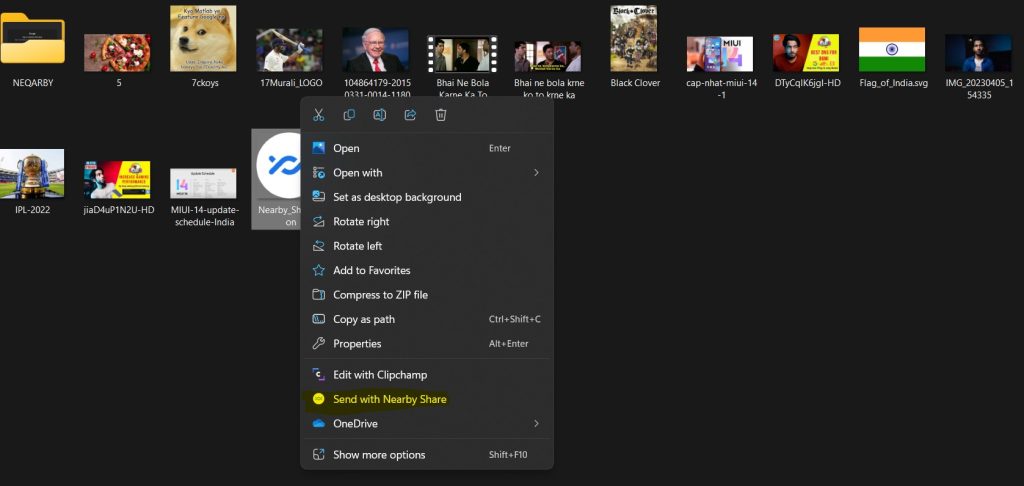
How to Use Nearby Share to Send Files from Windows to Android
  • This opens Nearby Share and starts searching for nearby devices. Depending on your visibility settings on other devices, you should see your device name here. Select this to send the file immediately.
  • Alternatively, you can open Nearby Share on Windows PC and click Select Files or Select Folders option to send the files or folders respectively.
  • Another way is to simply drag and drop files or folders on the Nearby Share app to discover and start sharing with nearby devices.

How to Use Nearby Share to Send Files from Android

To send files from Android phone to Windows system or another Android phone,

  • Select a file or folder, photo or video in the gallery, etc. in the file manager and tap on the share option.
  • On the Share blade, select the Share Nearby option.
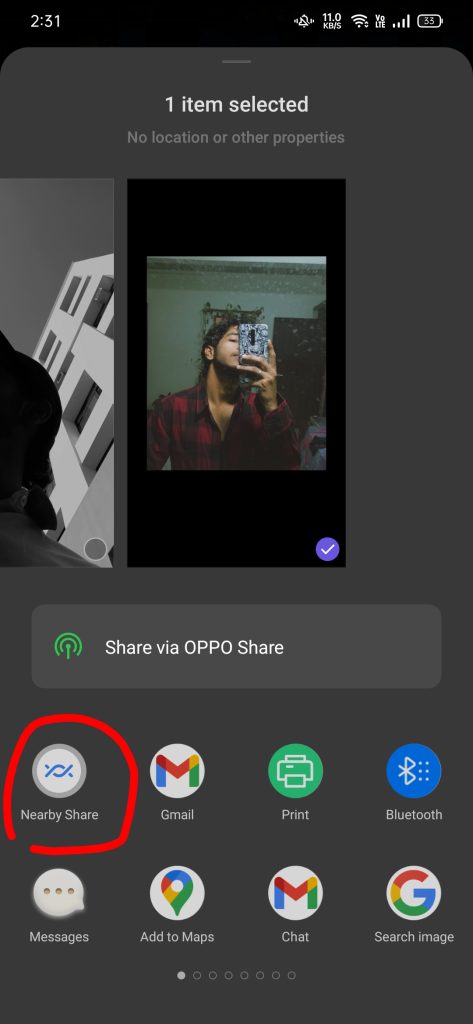
                                           How to Use Nearby Share to Send Files from Android
  • According to the Nearby app settings in Windows, you should see Your PC here. You normally won't need to open the Nearby Share app, but if you don't see your device in the Shares list, open the app and check device visibility in the left sidebar.
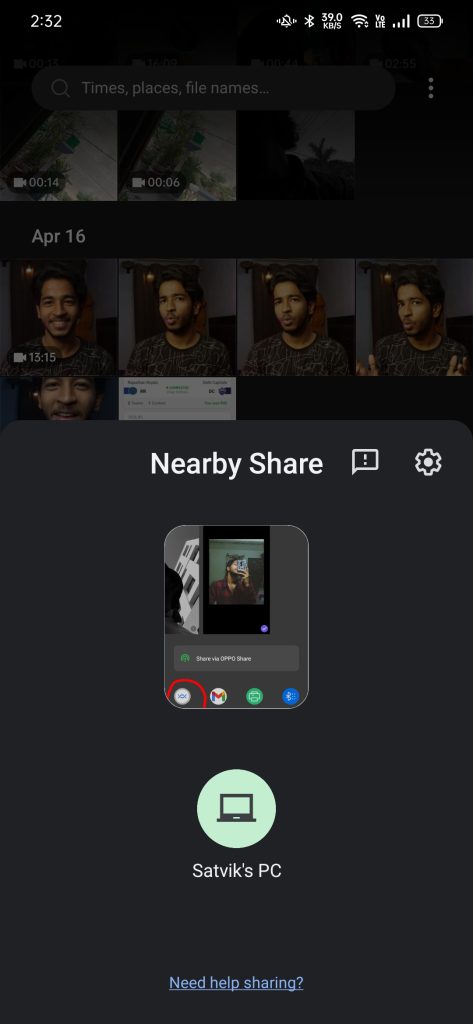
                                                  
  • Once you find your Windows device in the Near Share list, touch the file or folder to send it instantly

Nearby Share On Windows

Nearby Share On Windows is a long-awaited welcome feature that makes it easy to transfer files wirelessly. When you set up your Google account, you don't even need to accept files from other devices. Anyway, this feature is only useful for transferring files from Windows PC to Android or vice versa, but you can't share files between Windows and Windows.

You can also Subscribe to Us On YouTube for tech-related content. Please share this with your friends and family. Thanks for your time on our website and we wish you a nice day.

Sunday, January 1, 2023

Biggest upcoming anime 2023

 The year 2023 is almost here, which means another fantastic year of anime to look forward to. From new adaptations to popular returning series, we’ll have plenty to keep us entertained throughout the year. So we prepared a list of The Biggest upcoming anime in 2023.

In no particular order, here are our most anticipated anime of 2023.

The Biggest Upcoming Anime in 2023

Solo Leveling

Solo Leveling

Solo Leveling, a popular webtoon, is getting an anime adaptation, which will premiere in 2023. The series follows Jinwoo, a bounty hunter tasked with protecting humans from the world’s demons. He is chosen by a mysterious force that gives him superhuman strength, which changes his life completely. The adaptation will be directed by A-1 Pictures, the studio behind Erased and Sword Art Online. Unfortunately, original illustrator, DUBU passed away earlier this year, shortly after the anime was announced. We’re confident fans will appreciate what’s to come as we see their work on the screen for the first time, thanks to the high-quality team behind this production.

LINK TO ARTICLE:  Biggest upcoming anime 2023

Saturday, December 4, 2021

Best 4K TV under 50000 in India in 2021 | 43, 50 inches

Today we bring you a list of the Best 4K TV under 50000 in India. Televisions are no longer just idiotic boxes that can show you content from set-top boxes. Today’s TVs are smart, with the ability to connect to the internet, they have an app store from which you can download games and streaming service apps, and even help you connect to your IoT devices. Many of these TVs also come with a voice-enabled remote so you can tell the TV to play the content you are looking for.

Note that since we haven’t tested some of these TVs, they are here based on the features and specs they bring. In some cases, we have tested the larger screen sizes of these televisions, so we believe that the performance of the 43-inch version will be closer to that of its bigger brother. Many of these televisions run on the Android TV user interface. Hence, this list also includes the best 43-inch Android smart TVs.

Here’s the list of The Best 4K TV under 50000 in India in 2021


Friday, September 10, 2021

Best DNS for bgmi: Best free, public DNS servers in 2021


In this article, we will tell you the best DNS for bgmi: Best Free, Public DNS Servers in 2021. Free, public DNS servers provide an alternative way to connect securely online with the added benefit of potentially speeding up your Internet speed. DNS (Domain Name System) is a system (or protocol) that translates the domain names you enter in a browser into the IP addresse needed to access those sites.

Switching to a free public DNS server can make a real difference, with more responsive browsing and a 100% longer uptime record, meaning there's little chance for glitches.

Some services may also block phishing or access to infected sites, and some offer content filtering to keep your kids off the web.

What is DNS?

The Domain Name System (DNS) is a phone book for the Internet, a framework that translates domain names, such as facebook.com or twitter.com, into the IP addresses required for devices to load those Internet resources ( e.g. 126.125. 4.4). In geek terms, it's called resolution.

Best DNS for bgmi

Many people are facing ping/latency issues in BGMI in India. A lot of people don't even know how to go into the settings and change the DNS manually, so here is an app that will help you choose the best one for bgmi and also tell you whose DNS connect you to the best in bgmi Will get a good ping.

Read More: Best DNS for bgmi

Saturday, August 7, 2021

Vodafone Idea shutdown, 32000 Crore Total Dues | AGR dues

Vodafone Idea shutdown

 A conflicting verdict in a two-decade legal battle between India's mobile operators and the Indian government has led one of India's oldest telecom operators into trouble. Yes, we are talking about a merged company: Vodafone Idea Limited and Vodafone Idea Shutdown, and AGR Dues.

The share prices of the entity controlled by Vodafone Plc and Kumar Mangalam Birla have halved since the beginning of the year, while its counterpart, Bharti Airtel Ltd, has gained 15%. Vodafone Idea share prices have fallen more than 28% in the current week.

In this post, we find out what led to all this and what awaits the telecom operator.

To counter the onslaught of cheap data rates and free calls offered by Jio, two different operators, Vodafone and Idea Cellular, came together in 2018. When that wasn't enough, the promoters of the merged entity also injected money. However, nothing worked.

Source: Vodafone Idea shutdown


Download Google Pixel 6 Official Wallpapers Right Now!

Download Google Pixel 6 Official Wallpapers

 You requested to Download Google Pixel 6 Official Wallpapers for this. A few days ago, Google unexpectedly shared several details about its upcoming Pixel 6 series and the internal Google Tensor chipset that will power the devices. Today the folks at XDA Developers have managed to get the official Pixel 6 and 6 Pro wallpapers, and they look amazing.

Now, XDA has gained access to the Pixel 6 wallpapers by fooling the Google Wallpapers app. Since the Mountain View giant has already revealed various details of the devices, the XDA developers managed to trick the Google Wallpapers app into reflecting the build qualities of the Pixel 6 Pro. As a result, the Wallpaper app "thought" it was running 6 Pro. Thus, it revealed the new unreleased wallpaper of the Pixel device system. You can see the preview of the wallpaper below.

Download here: Download Google Pixel 6 Official Wallpapers

Friday, July 16, 2021

How to increase wifi speed in laptop/PC | 10 Unique ways to speed up wifi

Before you begin, run an internet speed test. This is not part of our official list of ten things, but it is a good reference. You want to know how fast you are now so that you can compare the results as you go through each step, to see if it is helping.

.net/


How to increase wifi speed in laptop/PC here are the 10 unique ways:


1. Turn the Router off and on again- Do this on your router. Do this on your modem. Do this with devices that you have connected to Wi-Fi. Everything needs a break at a time, but especially your modem and router.


2. Move your router to a better location- Wi-Fi can only travel so far, and its signals can be interrupted or blocked by walls, ceilings, furniture, appliances, and basically any large physical object. They can also be interrupted by radio waves from other devices, including cordless phones, baby monitors, microwaves, and Bluetooth speakers.


3. Adjust your router’s antennas- But if you have adjustable antennas on your router, try reconfiguring them. Router antennas are usually omnidirectional, which means that they send signals in all directions perpendicular to the antenna. is the list of "How to increase wifi speed on a laptop / PC". For example, a vertical antenna sends Wi-Fi signals horizontally and vice versa. So if you need to spread your Wi-Fi signals to multiple floors, adjusting an antenna so that it is positioned horizontally to spread Wi-Fi signals up and down could help.


4. Make sure you’re on the right frequency band- Modern routers primarily operate on two radio frequency bands: 2.4 GHz and 5 GHz. The band you use for your connection may affect your speed and the quality of your connection at different distances from your router.

The 2.4 GHz band has been used for Wi-Fi since the beginning but is also used for a ton of other wireless communications, so there may be slight congestion in the airwaves at this frequency. The maximum speed of this band is also slower than 5 GHz, but its range is better.


5. Update your router’s firmware- Since you have already logged into your router’s interface to check your Wi-Fi channel from step six, you can also check to see if a firmware update is available. Updating your router keeps it as secure as possible and keeps you up to date with the latest software fixes for known issues.


Read More Here- How to increase wifi speed in laptop

Wednesday, July 7, 2021

Best gaming keyboard under 3000 in India (2021)

 The article here provides you with the best gaming keyboards under 3000 in India. If you have a budget of up to Rs 1000-3000 then you are in right place. As we all know there are a lot of import restrictions at the moment, we tried our best to find the best gaming keyboards under 3000.

Here’s the list of Best gaming keyboard under 3000

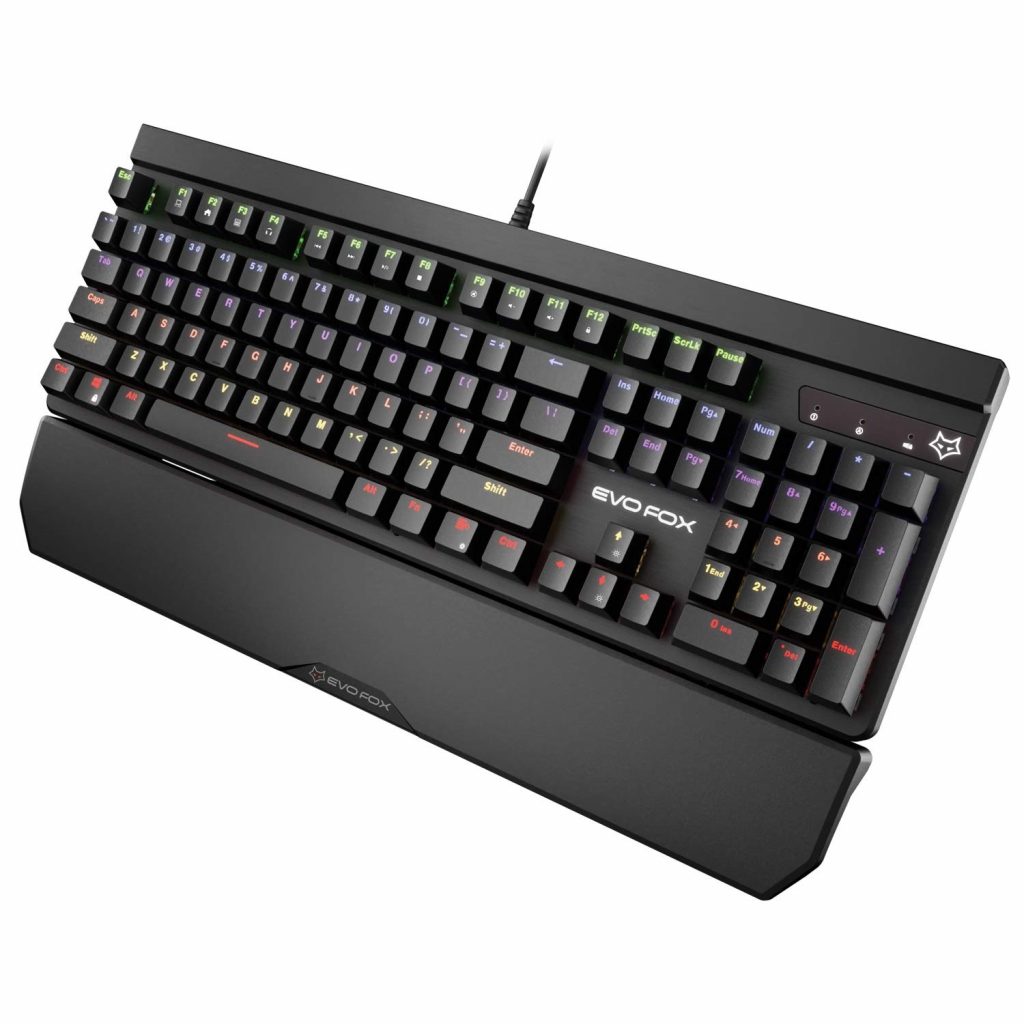
1. EvoFox Katana Fully Programmable Mechanical Gaming Keyboard

The EvoFox Katana comes with a fully programmable keyboard with blue keys that are rated for 50 million clicks. There are 9 LED effects, 5 brightness levels, 5 velocity modes, and the keyboard has 225 LED presets and can be customized with a dedicated key or your software.

It is equipped with a removable wrist rest for added comfort and has a Windows lock key.
EvoFox Katana Fully Programmable Mechanical Gaming Keyboard

Key Specification:

  • 100% anti-ghosting keys
  • 9 Unique Lighting Effects
  • Provides a comfortable runway for the wrists
  • Windows Lock key
  • 1.8m Braided Cable with a cable organizer
  • Weight- 1 kg 300 g
  • Price- ₹ 2,999


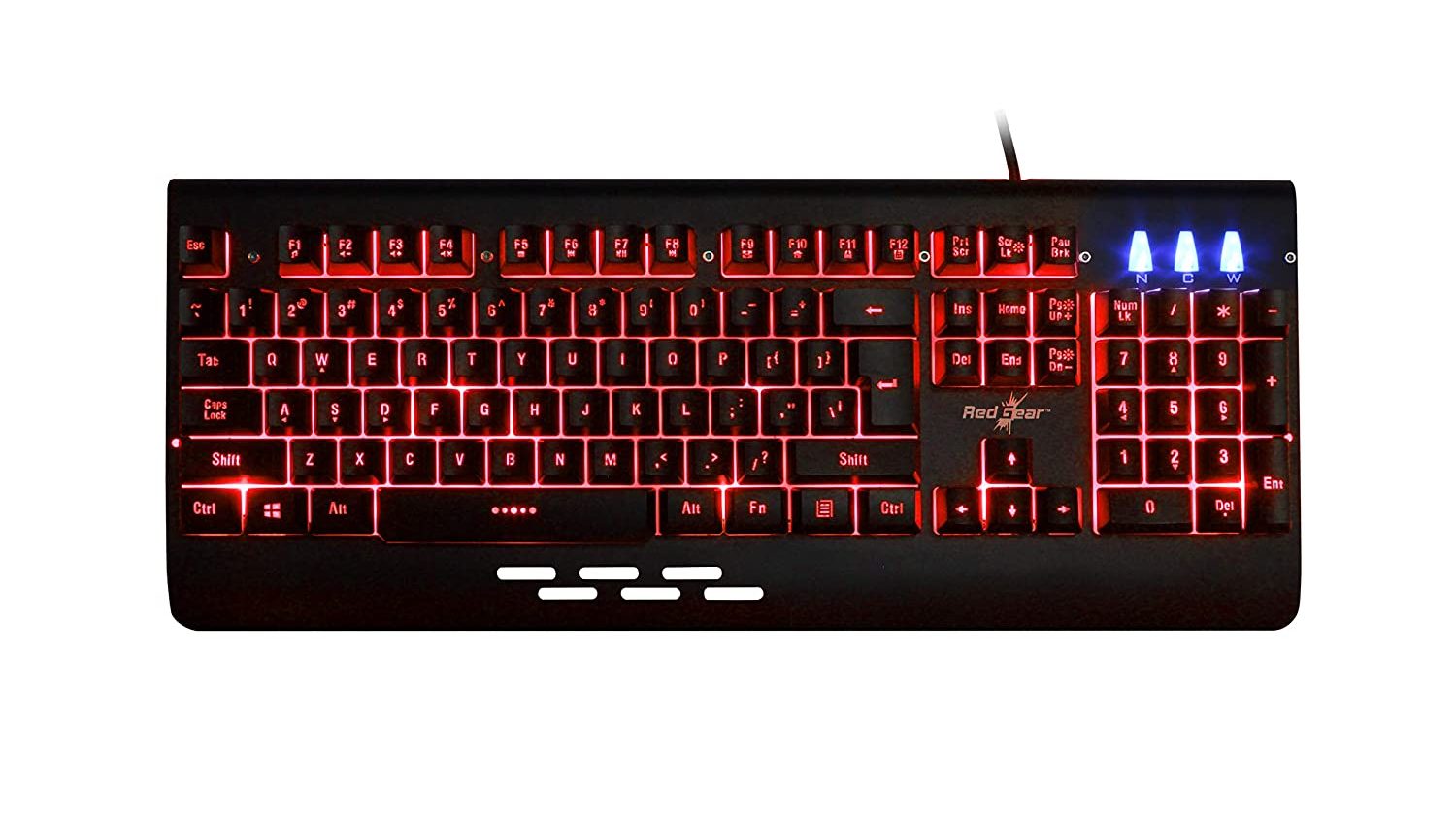
Redgear Blaze 7 Colour Backlit Gaming Keyboard

As some people want a single color on their keyboard, we have included the Radgear Blaze 7 in our list of best gaming keyboards under 3000. There are 7 different colors to choose from that you can create with dedicated software or keys.

The keyboard is good for its price and another cheaper version of it also available in 3 colors
Redgear Blaze 7 Colour Backlit Gaming Keyboard

Key Specification

  • Single color LED lights
  • Integrated multimedia keys
  • Windows lock key
  • 19 anti-ghost keys
  • Full Aluminium body
  • Weight- 895gm
  • Price- ₹ 1,199

Friday, February 8, 2019

Sony α6400 mirrorless camera with the world's fastest autofocus launched in India

With an AF acquisition speed of 0.02 seconds, the Sony α6400 is crazy fast

 
Sony α6400 mirrorless camera

Sony's full-frame camera lineup boasts of some advanced imaging features which the company has brought down to its new α6400 E-mount mirrorless camera. The α6400 boasts of the world's fastest autofocus acquisition at 0.02 seconds but that's just one of the interesting things about this camera.
With an AF acquisition speed of 0.02 seconds and 425 phase-detection and contrast- detection points spread across 84% of the image, the Sony α6400 is crazy fast, at least on paper. It sports a 24.2MP APS-C Exmor CMOS sensor backed by the company's latest BIONZ X image processor which allows the image sensor to reproduce colours more accurately along with several other image quality advancements. The ISO can be bumped up to ISO 102400 while creating pictures and Sony claims that the BIONZ X processor is able to assist in noise reduction between medium to high sensitivity. This is something that the Sony α6400 borrows from the company's full frame lineup.

The α6400 also features a real-time eye autofocus technology that deploys artificial intelligence (AI) to identify objects, more specifically, human eyes. The eye data is fed into the BIONZ X processor which processes it in a jiffy. Sony's camera will detect human eyes automatically and with half-a-press of the shutter button. In addition, users can choose between the right eye, left eye, auto select and a switch right/left eye function. Sony plans to roll out real-time autofocus support for animals through a software update which will be released in summer 2019.

Sony α6400 also has a new and real-time object tracking which utilizes AI algorithms to ensure that the pictures bear natural colours, accurate depth details and brightness. It also features a 180-degree LCD touchscreen that can be tilted to check and monitor the output. Users can also expect an overall higher shooting speed with upto 11fps using the mechanical shutter and up to 8fps while silent shooting. The α6400 is also the first Sony mirrorless camera which includes the HLG (Hybrid Log-Gamma) picture profile. This means that the camera supports HDR workflow allowing users to playback 4K HDR content on external displays.

Sony α6400 price and availability

The Sony α6400 is available pan India across various electronics stores and Sony Centers among others. There are three variants of the Sony α6400 that have been launched in India. The camera body is priced at Rs 75,990 while the α6400L with 16-50mm SELP1650 lens is available for Rs 85,990. Additionally, the α6400M with 18-135mm SEL18135 lens is also available at Rs 1,09,990.

For the latest tech news and reviews, follow Us on Twitter, Facebook, and subscribe to our YouTube channel.  

Also Read - Asus Zenfone 6 leaks indicates that it has 16:9 display and triple camera

Asus Zenfone 6 leaks indicates that it has 16:9 display and triple camera

Asus Zenfone 6 has made an appearance yet again

Asus Zenfone 6 leaks indicate a 16:9 aspect ratio display and three rear cameras


Asus Zenfone 6 has made an appearance yet again and it seems quite different than the previous rumours (via Android Pure) let alone the pictures of the prototypes that made their way to the web back in October 2018. The latest pictures indicate that the upcoming smartphone from Asus will feature a triple camera setup on the rear. There's also the gradient colour of the phone which seems to be a mix of maroon and blue hues. 

It also appears that the Zenfone 6 will have a 16:9 display without any cutout for a notch of any kind. This is a bit strange as the Taiwanese company launched the Asus Zenfone 5 and Zenfone 5Z last year with a notch design on the front and to succeed it with an older design just seems odd enough. There could be an explanation behind the move, if at all, and we could get more information regarding it as we near the launch.

In addition, the leaked pictures also indicate that Asus Zenfone 6 will have a home button on the chin which could double up as the fingerprint sensor. This is easily noticeable on the packaging that is kept below the phone which the source revealed to be the retail box of the Zenfone 6. There are thick bezels surrounding the front of the phone which hints at the possibility of a smaller screen-to-body ratio than what we have come to see from the latest 

For the latest tech news and reviews, follow Us on Twitter, Facebook, and subscribe to our YouTube channel


Thursday, February 7, 2019

Fresh Samsung Galaxy S10 series leaks confirm name of affordable model,

 
Fresh Samsung Galaxy S10 series leaks confirm name of affordable model, reverse charging tech on S10+  Fresh Samsung Galaxy S10 series leaks confirm name of affordable model, reverse charging tech on S10+

Highlights:

  • Listing shows the most affordable S10 phone having Galaxy S10e moniker.
  • Galaxy S10 and Galaxy S10+ show-off in-display fingerprint sensor.
  • True wireless Galaxy Buds may also launch at the ‘Unpacked’ event.
In the recent months, leaks and reports have given an idea of how the newest Galaxy S-Series phones from Samsung will look like. Thanks to a number of images, we now have a clearer picture of what these devices are expected to be called, and confirmation on some of the features that have been rumoured. From China-based Weibo to Germany-based Winfuture.de, multiple news making platforms have shared several images that solidify what we already know about these flagship devices.

Forget Galaxy S10 Lite, it’s Galaxy S10e

Initially, tipsters used the Galaxy S10 Lite moniker for the most affordable smartphone from the upcoming trio of Galaxy S10 devices. Now, the ‘Galaxy S10e’ name has been confirmed as all the three smartphones have been certified by Thailand’s NBTC certification agency. The listing certified the phones with model numbers SM-G970F/DS, the SM-G973F/DS and the SM-G975F/DS. These correspond to the Galaxy S10e, Galaxy S10 and Galaxy S10+ models respectively.

Fresh Samsung Galaxy S10 series leaks confirm name of affordable model, reverse charging tech on S10+  Fresh Samsung Galaxy S10 series leaks confirm name of affordable model, reverse charging tech on S10+


A few images have also been leaked showing a dual camera setup on the Galaxy S10e. In one of the images, a phone with flat screen and punch-hole camera is seen displaying Galaxy S10e on the boot screen. Another image in the lot is seen having Samsung’s new OneUI which is built atop Android 9. The third image shows the phone kept against another phone with a notch that looks like an iPhone XR. In our rumour roundup recently, we mentioned that the Galaxy S10e seems to be Samsung’s iPhone XR counterpart.

Fresh Samsung Galaxy S10 series leaks confirm name of affordable model, reverse charging tech on S10+  Fresh Samsung Galaxy S10 series leaks confirm name of affordable model, reverse charging tech on S10+

Galaxy S10 and Galaxy S10+ in-display fingerprint sensor

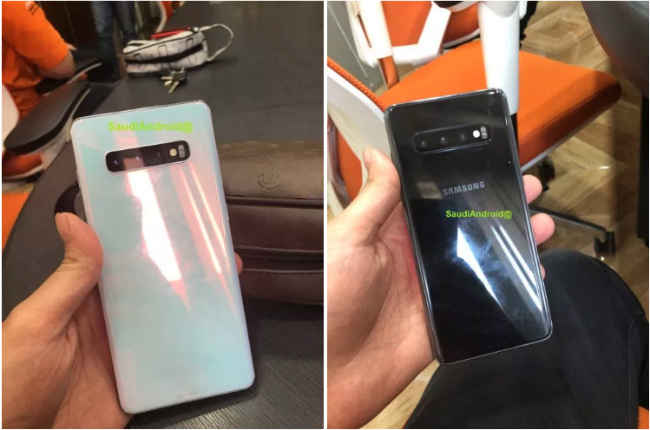
A Twitter user named SaudiAndroid had posted images of the Samsung Galaxy S10 and Galaxy S10+ showing off in-display fingerprint sensors. When we checked the link, the images were already removed, however, media outlets seemed to have already saved the images. One of these images show a phone with a locked-screen having an in-display fingerprint sensor at the bottom half of the device.
It has been widely reported that Samsung is adopting an ultrasonic fingerprint sensor on two of its upcoming devices. The images circulating on the internet show the Galaxy S10 and the plus variant in ‘Prism Black’ and ‘Prism White’ colours respectively. The Galaxy S10+ is seen having a in-display fingerprint sensor, and it has been reported that the Galaxy S10 will also have the same tech. Both the devices are also seen having a triple-camera setup on the back.

Reverse charging tech

Famous tipster Roland Quandt has shared an image in which a phone, which is claimed to be the Galaxy S10+, is seen having a pair of Samsung Galaxy Buds put on the back of the device. The image also confirms that the Samsung Galaxy S10+ will have a triple camera setup on the back. The image suggest two things: First, that the Galaxy S10+ is expected to have the reverse wireless charging tech that we have already seen on the Huawei Mate 20 Pro. The second is that Samsung is expected to unveil earbuds that have the wireless charging case support.

Pre-orders of the Galaxy S10 Series

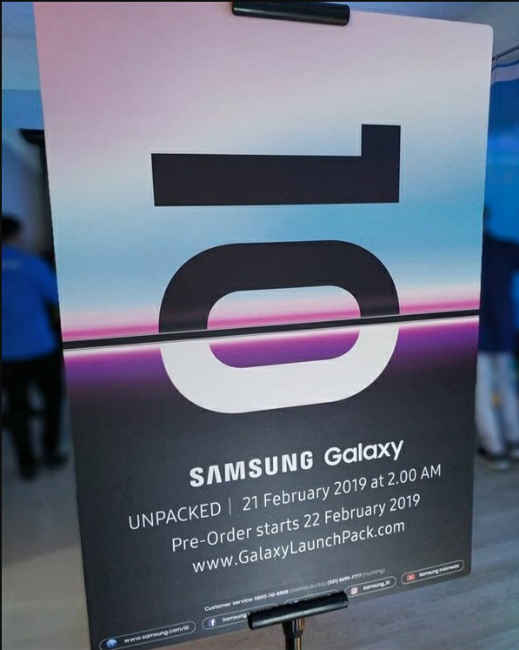
According to a report on Sparrow News, Samsung Galaxy S10 smartphones will be available for pre-orders a day after they are unveiled. Samsung is scheduled to launch the three phones at an ‘Unpacked’ event on February 20 in San Francisco. It may also announce the 5G model of the Galaxy S-Series as well as the foldable smartphone. As mentioned above, the next generation of Samsung Galaxy Buds with wireless charging case may also be launched.

Wednesday, February 6, 2019

Moto G7 Series Renders Leak Ahead of Launch, Moto G7 Plus Spotted on Geekbench

Moto G7 series is set to launch today, and ahead of the launch the smartphones have been leaked in high-resolution renders. The most premium variant was also spotted on Geekbench, tipping Snapdragon 660 processor and 4GB RAM on the Moto G7 Plus. Renders suggest dual rear camera setup on the Moto G7 and Moto G7 Plus and a single rear camera setup on the Moto G7 Play and Moto G7 Power. All the four phones come with a rear fingerprint sensor as well.
Moto G7 Series Renders Leak Ahead of Launch, Moto G7 Plus Spotted on Geekbench
Moto g7 play left Amd G7 power right


These fresh renders are courtesy tipster Roland Quandt. He has shared high-resolution images of the entire Moto G7 family on Twitter. The images reiterate all past leaks, and the Moto G7 and Moto G7 Plus are tipped to sport dual rear camera setups, waterdrop-shaped notch, and a rear fingerprint scanner. The Moto G7 Play and Moto G7 Power are expected to sport wider notches, single rear camera setups, and a rear fingerprint scanner as well.
Moto G7 Series Renders Leak Ahead of Launch, Moto G7 Plus Spotted on Geekbench
Moto g7 left and g7 power right

The Moto G7 Plus was also spotted on Geekbench and it is listed to come with 4GB of RAM, Snapdragon 660 processor, and is listed to run on Android Pie. Its single-core score is 1,334 and its multi-core score is 4,831 on the benchmarking site. The Geekbench listing was spotted by DroidShout.
The Moto G7 series launch event will begin at 10am local time (5:30pm IST) in Sao Paulo, Brazil. Users can live stream the event on Motorola's social channels, and you can confirm your attendance here. You can also follow Motorola Brazil's Twitter handle to get updates on the live stream just ahead of the launch. The company is also taking registrations of interest on the company's website, and you can head here to register. The Moto G7 series is tipped to be priced starting at EUR 149 (roughly Rs. 12,100).

Motorola Moto G7

Motorola Moto G7


Motorola Moto G7 Play

Motorola Moto G7 Play


 Motorola Moto G7 power

Motorola Moto G7 power


Motorola Moto G7 Plus

 Motorola Moto G7 Plus


For the latest tech news and reviews, follow Us on Twitter, Facebook, and subscribe to our YouTube channel.

Oppo K1 Price,Specification and Review

Oppo Had lauched Oppo k1 with new series K on 6 February 2019. Its Their first Made In India Phone. It is Mid range phone Oppo K1 Price Is Rs16990. It is lauched in two colour varients Astra blue,Piano Black.It special Feature is that it has In display fingerprint scanner.

Buy Oppo K1 From here and Get 10%off


Oppo K1 Price,Specification and Review

Oppo K1 Specification-


General

In The Box
  • Handset, Earphone, Micro-USB Cable, Adapter, SIM Card Tool, Case, Screen Protect Film, Important Information Booklet with Warranty Card, Quick Guide
Model Number
  • CPH1893
Model Name
  • K1
Color
  • Astral Blue
Browse Type
  • Smartphones
SIM Type
  • Dual Sim
Hybrid Sim Slot
  • No
Touchscreen
  • Yes
OTG Compatible
  • Yes
Sound Enhancements
  • Dual Microphone


Display Features

Display Size
  • 16.28 cm (6.41 inch)
Resolution
  • 2340 x 1080 pixels
GPU
  • Adreno GPU 512
Display Type
  • AMOLED On-cell
Display Colors
  • 16M
Other Display Features
  • Bezel: 1.7mm (Left and Right), 2.05mm (Up), 4.36mm (Down), Screen Contrast: 60000:1, Color Gamut: 100% (Typical), Screen Brightness: 430 nits (Typical), Screen to Body Ratio: 91%


Os & Processor Features

Operating System
  • Android Oreo 8.1
Processor Type
  • Qualcomm Snapdragon 660 Octa Core 1.95 GHz
Processor Core
  • Octa Core
Primary Clock Speed
  • 1.95 GHz
Operating Frequency
  • GSM: Bands 850/900/1800/1900, 3G: Bands 850/900/1700/1900/2100 MHz, LTE: B1/B2/B3/B4/B5/B7/B8/B18/B19/B20/B26/B28/B38/B39/B40/B41 (120 MHz)


Memory & Storage Features

Internal Storage
  • 64 GB
RAM
  • 4 GB
Expandable Storage
  • 256 GB
Supported Memory Card Type
  • microSD
Memory Card Slot Type
  • Dedicated Slot


Camera Features

Primary Camera Available
  • Yes
Primary Camera
  • 16MP + 2MP
Primary Camera Features
  • Aperture: F1.75 + F2.4, Photo Size: 4608 x 3456 pixels, 77Degree Field of Angle, Camera Sensor Type: CMOS, Auto Focus, Camera Effects: Beautification, Filter, Sticker, Burst Mode, Macro Focus: 10 cm
Secondary Camera Available
  • Yes
Secondary Camera
  • 25MP
Secondary Camera Features
  • Aperture: F2.0, Photo Size: 4312 x 5760 pixels, 79Degree Field of Angle, Camera Sensor Type: CMOS
Flash
  • Rear LED Flash
Dual Camera Lens
  • Primary Camera
Call Features
Call Records
  • Yes


Connectivity Features

Network Type
  • 4G VOLTE, 4G, 3G, 2G
Supported Networks
  • 4G VoLTE, 4G LTE, WCDMA, GSM
Internet Connectivity
  • 4G, 3G, Wi-Fi, EDGE, GPRS
3G
  • Yes
3G Speed
  • HSPA+, HSPA: DL - 42.2 Mbps, UL - 11 Mbps
GPRS
  • Yes
Micro USB Port
  • Yes
Bluetooth Support
  • Yes
Bluetooth Version
  • 5.0
Wi-Fi
  • Yes
Wi-Fi Hotspot
  • Yes
USB Connectivity
  • Yes
EDGE
  • Yes
Audio Jack
  • 3.5mm


Other Details

Smartphone
  • Yes
Touchscreen Type
  • Capacitive with Multi-touch
SIM Size
  • Nano SIM
User Interface
  • ColorOS 5.2
Removable Battery
  • No
Graphics PPI
  • 402 PPI
Sensors
  • In-display Fingerprint Sensor, Magnetic Induction, Light Sensor, Proximity Sensor, G-sensor, Acceleration Sensor, Sensor Hub, E-compass
Ringtones Format
  • OGG
Other Features
  • 4G+, Data Service: TD-LTE, FDD-LTE, 4G Data Rate: DL - 750 Mbps, UL - 300 Mbps, Face Recognition, Split Screen (Specific Apps), Kids Space, Clone Apps, Night Shield, Game Acceleration (Specific Apps), Oshare (Aim at the Indian Phone Number Recognition), Program Frozen, File Encryption, Flashlight, Picture Format: JPG, PNG, BMP, GIF, Webpage Video Play, Import and Export Contacts, Import and Export Messages, Files Compression and Decompression, Call Records: 3000, Group Send Upper Limit: 200, Wi-Fi: WLAN 2.4G, WLAN 5.1G, WLAN 5.8G, WLAN Display, Support HD


Multimedia Features

Audio Formats
  • WAV, AAC/M4A, MP3, WMA, AMR/AWB, FLAC, ALAC, OGG, AIFF, APE, MID/MIDI/IMY, MP2, QCELP, EVRC, 3GPP
Video Formats
  • MP4
Battery & Power Features
Battery Capacity
  • 3500 mAh
Talk Time
  • 28 hrs 1 min


Dimensions

Width
  • 75.5 mm
Height
  • 158.3 mm
Depth
  • 7.4 mm
Weight
  • 156 g


Warranty

Warranty Summary
  • Brand Warranty of 1 Year Available for Mobile and 6 Months for Accessories


Oppo K1 Features-


 Oppo K1 Colour Varients

Oppo K1 Processor


Oppo K1 Review- 

It is a Mid Range Phone and price is Rs16990. It has Dual Camera and main feature is it has in display fingerprint scanner.It Has battery of 3500mAh. It has oppo's ColorOs v5.2. They all are powered with Qualcomm snapdragon 660 Octa core Processor 1.9GHz with Android 8.1 with 6.41 Inch Display.I think it is a phone that can make some impact on India's smartphone market.

Oppo K1 Review Everything Rating- 9/10

Please Don't Forget to leave a comment and tell us what you like about this phone!